Arrow Game – Play Arrow Escape Online Free
Play Arrow Escape, a free arrow puzzle game where every line needs a clear way out. Read the arrowheads, remove the blockers and untangle 300 picture levels. Tap on your phone or click on your computer — no download or signup needed.
Now playing: Arrow Escape. Gameplay, sound and fullscreen controls are inside the game — or open the full Arrow Escape page.
How to play this arrow puzzle game
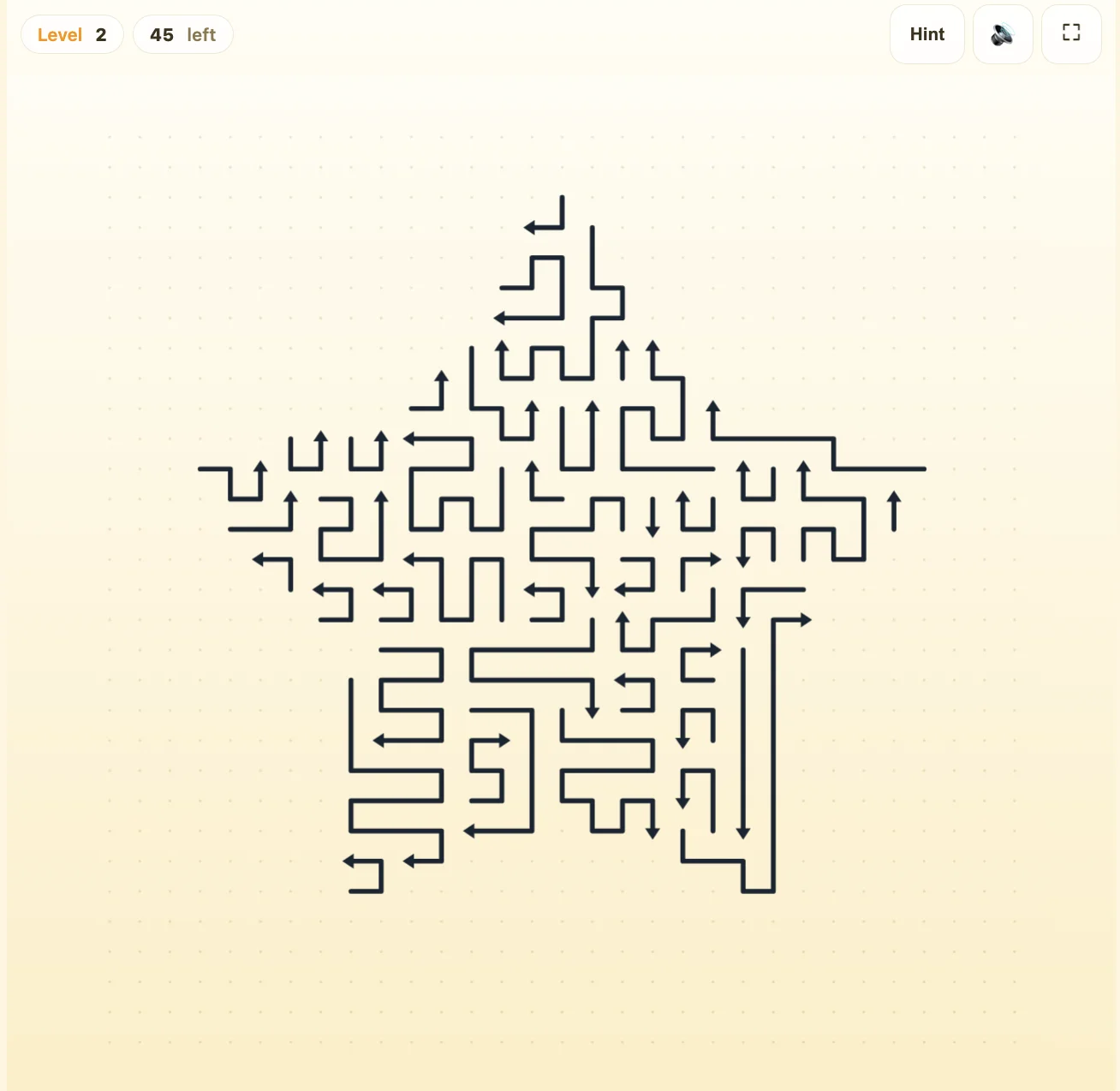
Your goal is to remove every curved arrow line from the picture. Each arrowhead points in the direction that its line will leave. The challenge is finding the right order: one line may be ready to escape while another has several blockers in front of it.
- Find an arrowhead. Look at the pointed end of a line, then trace a straight route from that point toward the edge of the board.
- Check the exit. If another line crosses that route, it must leave before your selected arrow can escape.
- Tap or click a clear line. Its head moves forward and the curved body follows its own path out of the picture.
- Check the board again. A successful removal can open routes for several other arrows. The “left” counter shows how many remain.
- Empty the picture. When the final line leaves, select Next Level to start the next puzzle.
You do not drag the arrows, rotate them or draw a new path. A long, winding line can still be a valid move: what matters is the route in front of its head. Its own body does not block it. For the full rules, visit the Arrow Escape game guide.
How to untangle arrows when you get stuck
Follow the blocker instead of tapping the same line
Suppose a right-facing arrow A cannot leave because line B crosses its exit. Check B’s arrowhead next. If B points upward into an empty route, remove B first, then return to A. If a third line blocks B, follow that chain until you reach a clear exit. Work backward as the space opens up.
Start with clear exits around the picture
Scan outward-facing arrowheads near the edges as a starting point. They often have shorter routes to inspect, but being near an edge does not automatically make a line free. Check the whole route in front of the head, then look again after each removal. You do not need to plan the entire level before making your first move.
Use a hint to understand the next move
A blocked arrow bumps back safely. Treat that movement as a clue about which line is in the way. If the picture is hard to read, select Hint and study the highlighted arrow’s exit before tapping it. This helps you spot the same pattern on later boards. See our arrow puzzle tips for more ways to read blocking chains.
300 picture levels, starting with a simple arrow
Arrow Escape starts with an Upward Arrow, followed by a Five-Point Star, a Car and a Heart. Each silhouette is built from separate lines rather than a single path. As you remove them, the familiar picture breaks apart and the remaining exit routes become easier to see.
The numbered sequence is fixed, so a given level uses the same picture when you return. Several removal orders can work; focus on finding an available move instead of memorizing every tap. Our Arrow Escape walkthrough for levels 1–4explains what to look for in each opening shape.
Play on mobile or desktop
On a phone, scroll to the game and tap a line to select it. The frame scales with your screen, leaving room for the site navigation above it. On a computer, use your mouse to click the same lines. You can take time to inspect the board before making a move.
| Control | What it does |
|---|---|
| Tap / click a line | Attempt to slide that arrow out of the picture. |
| Hint / H | Highlight an available move. Click inside the game before using the keyboard shortcut. |
| Sound button | Turn game sound effects on or off. |
| Fullscreen button | Expand the game where supported by your browser. |
Completed-level progress is saved in browser storage when available. Use the same browser and device when you return; clearing its site data can reset your progress. If the board has not appeared, check your connection and reload the page so the game files can finish loading.
More arrow games to play
Enjoy the line puzzles? Arrow Go adds colorful lines, faster movement and an optional timer. Arrow Offline is designed to keep playing after its files load. For a different kind of challenge,Bow and Arrow switches from untangling lines to archery.
Arrow Escape
Untangle curved arrow lines across 300 calm puzzle levels.
Play now →Arrow Go
A faster, colorful line-slide puzzle with optional timing.
Play now →Arrow Offline
A calm line-slide arrow puzzle designed for offline play.
Play now →Bow and Arrow
Draw the bow, aim for the bullseye — online archery.
Play now →Arrow game questions and answers
What is the arrow game on this page?
The playable game is Arrow Escape, a picture puzzle made from curved arrow lines. Tap a line whose arrowhead has a clear exit, then keep removing lines until the board is empty.
Is this arrow puzzle game free to play without a download?
Yes. You can play Arrow Escape here in your browser without installing an app or creating an account. An internet connection is needed to load the embedded game.
Why does an arrow bounce back instead of leaving?
Another line is blocking the arrowhead’s straight exit route. The selected line returns to its place. Follow the route to find the blocker, remove that line when its own exit is clear, then try again.
How do hints work?
Select Hint, or press H while the game has keyboard focus, to highlight a line that can escape. A hint does not remove the line for you and can be used again without spending a limited resource.
Can I play on a phone?
Yes. Tap the lines directly on a touchscreen. The game frame adapts to the available screen space. Scroll to the game to see the board and its controls together, or use the fullscreen button if your browser supports it.
How many levels does Arrow Escape have?
Arrow Escape has 300 picture levels. The opening sequence is Upward Arrow, Five-Point Star, Car and Heart. Clear every line in a picture, then select Next Level to continue.
Will my progress be saved?
Level progress is stored in your browser when browser storage is available. Return using the same browser and device to continue. Clearing site data or using a private session can remove that progress; it is not an account-based save shared across devices.
Is there only one correct order for removing arrows?
No. More than one line may have a clear exit at the same time. Removing a line cannot add a new blocker, so you can choose any available line and reassess the board after it leaves.